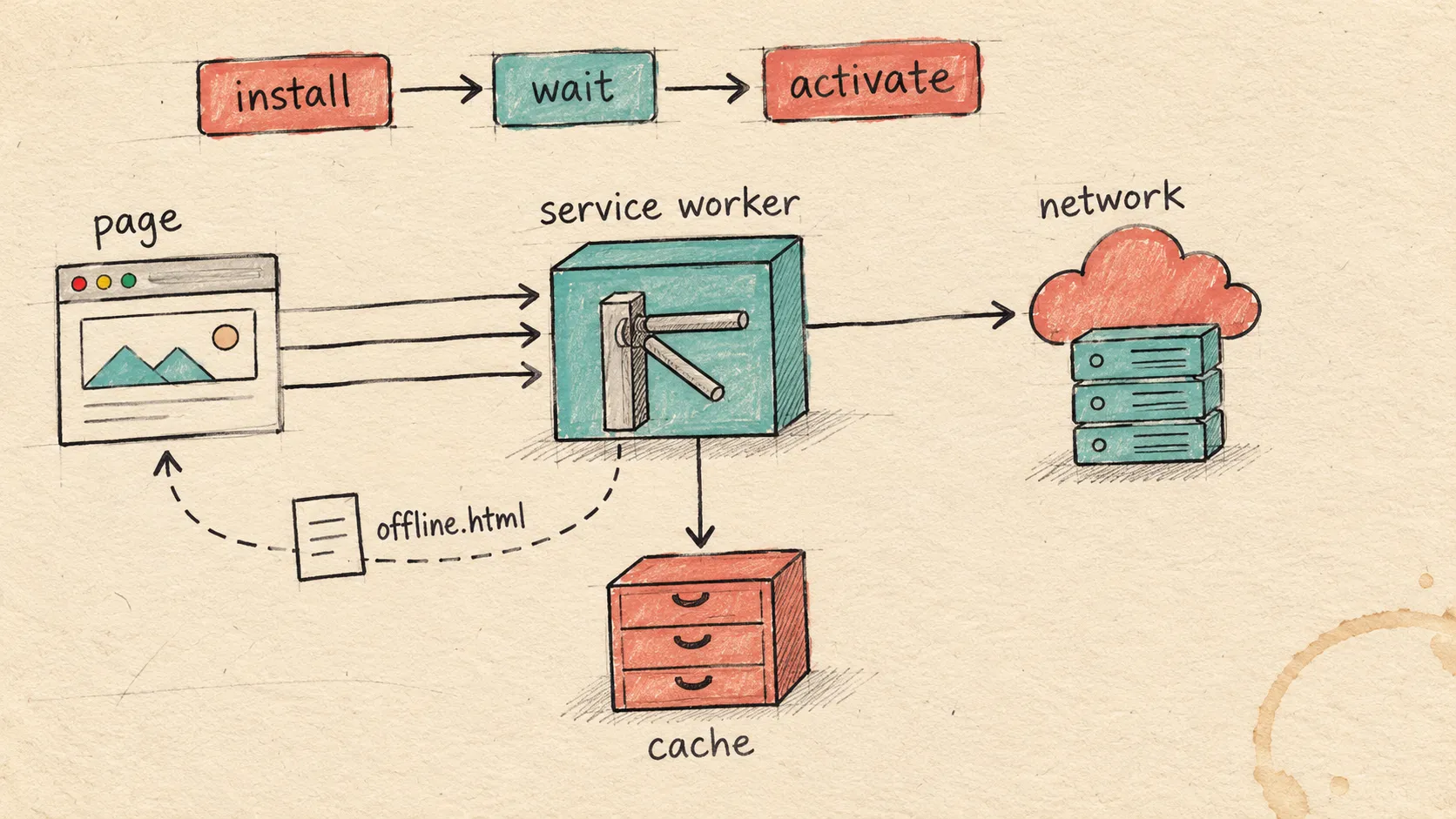
Service worker caching strategies seem pretty clever until you’ve actually got a user with two tabs open and you’re serving them stale HTML.
At that point the limitations are very obvious. A service worker is a very small deployment mechanism that lives in the browser. It has a lifecycle. It has upgrade rules. It has all sorts of failure modes where the same code will behave differently on different pages, or where a refresh will appear to have worked but in fact hasn’t.
MDN’s guidance(opens in new tab) goes through the model step by step: the service worker installs, may wait, then activates when it’s safe. Once you’ve got a handle on that sequence and you’ve learned to match your caching strategy to the type of request you’re making, the rules become very predictable.
tipThe next one in the series is Advanced PWA Features which looks at background sync, push notifications and IndexedDB. That one builds on the routing and lifecycle patterns covered in this guide.
Before you write code, decide whether a service worker earns its keep
A service worker is only really worth adding when you need it for offline support, custom caching, navigation reloads or background refreshes. You won’t necessarily need one on every site.
If you’re using server rendered pages and your CDN is healthy then standard HTTP caching will quite often get you where you need to be. “Can I cache this?” is the easy question. “Can I update this safely?” is the real one.
The lifecycle, because most bugs start here
noteA service worker runs in a worker context and only handles requests from pages it controls within its scope. The worker at
/sw.jscontrols a lot more of your site than the one at/app/sw.js.
1. Register from the page
if ("serviceWorker" in navigator) { window.addEventListener("load", async () => { try { const registration = await navigator.serviceWorker.register("/sw.js"); console.log("Registered with scope:", registration.scope); } catch (error) { console.error("Registration failed:", error); } });}Registration is simply the browser agreeing to take responsibility for the worker. It doesn’t mean that the current page is immediately controlled by that new worker.
MDN documentation makes it very clear that a document begins life as either controlled or uncontrolled and it remains in that state for the duration of its life unless you specifically state otherwise.
2. Install, and pre-cache the smallest honest shell
The install event is the very first lifecycle event that a new worker receives. It’s the ideal place to cache the resources that your offline shell actually needs.
const APP_SHELL_CACHE = "app-shell-v3";const OFFLINE_URL = "/offline.html";const APP_SHELL_ASSETS = [  "/styles/main.a8f5f1.css",  "/scripts/app.3c9d2e.js",  OFFLINE_URL,];
self.addEventListener("install", (event) => {  event.waitUntil(    caches.open(APP_SHELL_CACHE).then((cache) => cache.addAll(APP_SHELL_ASSETS)),  );});
The hashes stand in for whatever your build emits. A file name that changes as a result of the file’s content is what makes Cache First safe for those files subsequently.
Two practical caveats:
cache.addAll()(opens in new tab) is strict. If one request fails, the installation fails.- Pre-cache the absolute minimum you need for a resilient shell. Don’t go in and pre-cache every asset you can think of. That’s where pre-caching becomes bloated and slow.
3. The waiting phase
If an older service worker is still in control of the open pages then the new one will install and then just sit there.
The wait is protective in that we have two versions of our caching logic which will never fight over the same pages. A refresh isn’t sufficient to terminate the wait as the old page remains open whilst the new one is loading(opens in new tab). A refresh in one of the two open tabs will leave the other tab still on the old worker. Every page that the old worker is controlling has to close or navigate out of scope before the new one can activate.
4. Activate, clean up old caches
The activate event is the perfect place to delete the old caches so they don’t just sit around for ever.
const RUNTIME_CACHE = "runtime-v3";const CURRENT_CACHES = new Set([APP_SHELL_CACHE, RUNTIME_CACHE]);
self.addEventListener("activate", (event) => {  event.waitUntil(    (async () => {      const cacheNames = await caches.keys();
      await Promise.all(        cacheNames          .filter((name) => !CURRENT_CACHES.has(name))          .map((name) => caches.delete(name)),      );    })(),  );});
5. skipWaiting() and clients.claim() for deliberate updates
skipWaiting() has the new worker skip past the waiting state as soon as it can. clients.claim() allows an active worker to take control of any currently open pages, which will trigger a controllerchange on those pages.
On first registration claim() takes care of the open pages immediately rather than waiting until the next reload.
skipWaiting() has a gotcha. The new worker is likely to be the one controlling pages that were loaded with the old worker so some of the page’s fetches will go to the old worker and some to the new one. If that could potentially break things then don’t use it. The activate handler described above is one such case: it deletes the old cache so an open old page that requests a hashed file it hasn’t fetched yet will go to the network and the new deploy may no longer be serving that file.
Use them when the app displays a ‘new version available’ prompt, the new worker is backward compatible with pages already open, or the app shell is sufficiently tightly controlled such that immediate takeover is safe. Otherwise the safer default is to let the browser hold the new worker in limbo.
Choose strategies per request type
Stop asking ‘what strategy does my app use?’ and start asking ‘what strategy does this request deserve?’
| Request type | Good default | Why | Watch out for |
|---|---|---|---|
| Versioned CSS/JS/fonts | Cache First | Fast, stable, usually deploy-versioned | Stale URLs without cache busting |
| HTML navigations | Network First | Fresh content when online | Need an offline fallback |
| Read-mostly images or article lists | Stale-While-Revalidate | Fast response, background refresh | Stale version shows now; fresh copy appears on the next load |
| APIs with user-visible fresh data | Usually Network First or network-only | Correctness matters more | Slow connections, retries |
POST/PUT/DELETE | Network, queue, or Background Sync | Cache Storage is not the tool here | Pretending writes are cacheable |
A tiny helper layer makes the strategies safer
The first production hardening step is boring really: be explicit about what you’re prepared to cache.
function shouldCache(response) {  return response.status === 200 && response.type === "basic";}
async function fromCache(cacheName, request) {  const cache = await caches.open(cacheName);  return cache.match(request);}
async function saveToCache(cacheName, request, response) {  // Cache writes can fail (quota, 206 partial, Vary: *). Don't let that break the response.  try {    const cache = await caches.open(cacheName);    await cache.put(request, response);  } catch {    // Swallow the error; the network response is still good.  }}
Two guards protect the cache write:
- Checking
status === 200(not justok, which is true for 200–299 and includes 206) screens out partial responses thatCache.put()rejects. - The
try/catchdeals with quota overflows,Vary: *headers and any other write failures so a cache error doesn’t cause the network response to the user to break.
type === "basic" keeps cross-origin responses out of the cache. If you want cross-origin images or fonts then you’ll have to widen it on purpose and test it on the browsers that your users actually have.
Strategy 1: Cache First
Cache First means ‘prefer speed, then go to the network on a miss’.
async function cacheFirst(cacheName, request, event) {  const cachedResponse = await fromCache(cacheName, request);  if (cachedResponse) {    return cachedResponse;  }
  const networkResponse = await fetch(request);
  if (shouldCache(networkResponse)) {    event.waitUntil(saveToCache(cacheName, request, networkResponse.clone()));  }
  return networkResponse;}
The cache write goes to event.waitUntil() so the response isn’t blocked whilst the clone is written. Cache.put() only settles down once it’s had the full body.
Use it for assets that have versioned or hashed URLs (scripts, styles, icons, fonts). A changed file will have a new URL so a cached copy will never go stale. The old copies will of course accumulate. The earlier example uses APP_SHELL_CACHE with a -v3 suffix. Just increment that on each release and the activate handler will clear out the old cache (which will also cause /offline.html to be refreshed as it has no hash).
Don’t use it for HTML or API endpoints where the URL is static but the content is dynamic. The only exception to this is a precached, revisioned app shell (e.g. a single page app’s index.html with an update prompt) which can use Cache First as it only updates when the new worker is activated. In all other cases the user will continue to see the cached response even though the content at that URL has changed.
Strategy 2: Network First
Network First - ask the network first and fall back to the cache only if the network is not available.
async function networkFirst(cacheName, request, event) {  try {    const networkResponse = await fetch(request);
    if (shouldCache(networkResponse)) {      event.waitUntil(saveToCache(cacheName, request, networkResponse.clone()));    }
    return networkResponse;  } catch (error) {    const cachedResponse = await fromCache(cacheName, request);    if (cachedResponse) {      return cachedResponse;    }
    throw error;  }}
This is great for navigations and APIs where you care about the current data. The trade-off is real though in that the user is going to sit there waiting for the network. On a slow network that delay is quite apparent. If your users are going to be offline for significant periods of time or on very flaky connections you may well want to consider a timeout based version. For example, Workbox’s Page Cache recipe defaults to a 3 second network timeout and will fall back to the cache if the network doesn’t respond within that time. You need to be very clear about what you’re giving up.
Strategy 3: Stale-While-Revalidate
Stale-While-Revalidate splits the difference: serve the cached copy now, then revalidate it for the next time.
async function staleWhileRevalidate(cacheName, request, event) {  const cachedResponse = await fromCache(cacheName, request);
  const networkPromise = fetch(request)    .then(async (networkResponse) => {      if (shouldCache(networkResponse)) {        await saveToCache(cacheName, request, networkResponse.clone());      }
      return networkResponse;    })    .catch(() => undefined);
  event.waitUntil(networkPromise);
  if (cachedResponse) {    return cachedResponse;  }
  const networkResponse = await networkPromise;  return networkResponse ?? Response.error();}
event.waitUntil() is the key here. If you just return the cached response straight away without waiting for the event to be fully processed then the worker can be terminated before the background update has actually finished.
This is a good strategy for content that can be fairly stale (images, avatars, read-mostly lists etc). It’s a terrible fit for auth state, inventory counts, account balances or anything in the vicinity of checkout.
A fetch router that stays straightforward
Route by request type, make the rules very clear and just leave the unknowns alone unless you have a very good reason to go in and intercept them.
async function handleNavigation(event) {  // Caches every successful navigation, so this assumes public HTML.  try {    return await networkFirst(RUNTIME_CACHE, event.request, event);  } catch {    return (await fromCache(APP_SHELL_CACHE, OFFLINE_URL)) ?? Response.error();  }}
self.addEventListener("fetch", (event) => {  const { request } = event;
  if (request.method !== "GET") {    return;  }
  const url = new URL(request.url);
  if (request.mode === "navigate") {    event.respondWith(handleNavigation(event));    return;  }
  if (    url.origin === self.location.origin &&    ["style", "script", "font", "worker"].includes(request.destination)  ) {    event.respondWith(cacheFirst(APP_SHELL_CACHE, request, event));    return;  }
  if (url.origin === self.location.origin && request.destination === "image") {    event.respondWith(staleWhileRevalidate(RUNTIME_CACHE, request, event));    return;  }
  // Caches every successful /api/ GET, so this assumes public, non-personalised data.  if (url.origin === self.location.origin && url.pathname.startsWith("/api/")) {    event.respondWith(networkFirst(RUNTIME_CACHE, request, event));    return;  }});
This routing strikes a balance between freshness and speed: navigations stay fresh where they can, the app shell remains fast, images are updated in the background and APIs default to being correct.
The omission is deliberate: there is no single rule that will cache every GET request. Unknown request types simply pass through to the network. The same applies to every navigation and every /api/ request. A cached response will survive the session so personal pages and personal API data will need their own rule. These should be routed to the network only, prior to networkFirst().
Browser and platform realities
Service workers need HTTPS in production (localhost is permitted in dev).
Browsers are free to evict their cached data under storage pressure(opens in new tab). Anything you cache therefore must be re-creatable as the browser may delete it at any point. Safari and iOS storage behavior can be different to that of Chromium browsers so you should test in Safari/iOS if that’s the environment your users are in.
A service worker adds a programmable caching layer but doesn’t in any way replace the HTTP cache or get rid of the need for good CDN headers. Cache Storage is only for GETs. For writes (POST, PUT, DELETE) you’re going to want to use retries, queues and Background Sync where you can.
Service workers are at their very best when they’re simple and reliable. Give them a very narrow job, tailor your service worker caching strategy to the types of request they’re going to be serving and respect the lifecycle rules that the browser is already trying to protect you with. That’s the way to get offline support, faster repeat visits and graceful fallbacks without inadvertently serving stale data to a user who didn’t actually ask for it.


